From here you can book your game console, controller repair with us
Game Console & Controller Repairs
Any PS5 Console, PS5 Controller
Any PS4 Console, PS4 Controller
Any Xbox Series Console, Xbox Series Controller
Any Xbox One Console, Xbox One Controller
Any Nintendo Switch Console, Joy Con Controller
PS5 Not Reading Discs? Here’s What to Check Before Getting Your PlayStation Repaired in Chennai
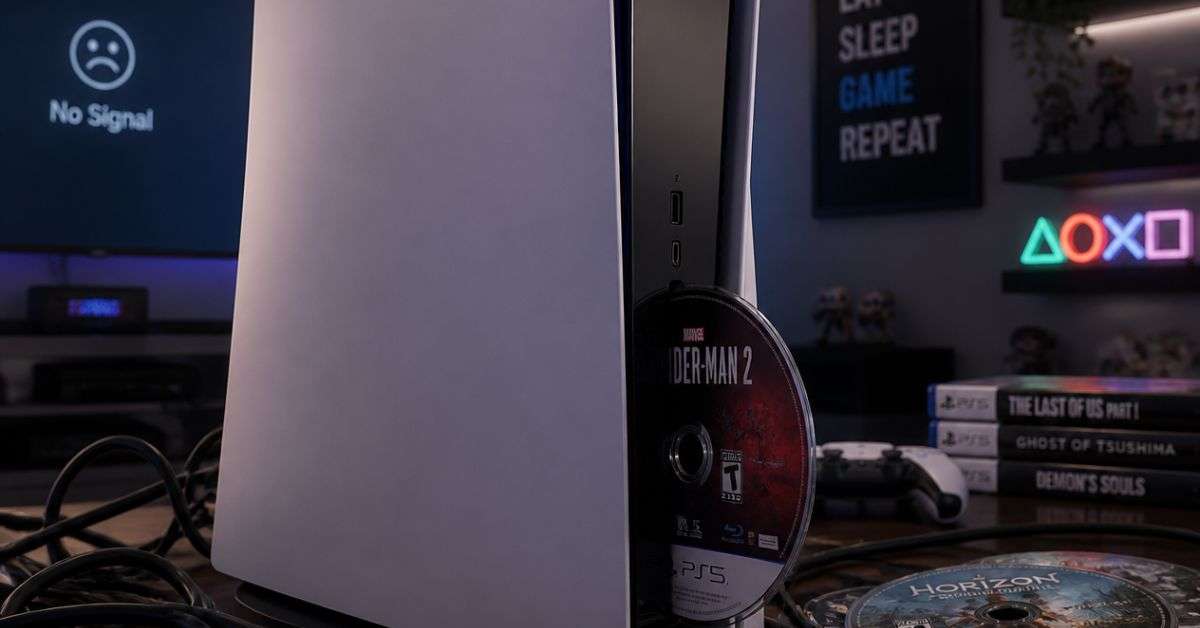
Imagine buying a new PlayStation 5 game, bringing it home, and getting ready to play. You insert the disc, expecting the game to start installing.
Instead, your PS5 displays an error: Unrecognized Disc.
You remove the game, wipe it carefully, and try again. The console makes a few sounds, but the game still refuses to load.
It’s frustrating, especially when your other PlayStation features seem to be working perfectly.
If your PS5 is not reading discs, making unusual disc drive noises, or refusing to accept a game disc, there are several possible explanations.
Some issues can be resolved with basic troubleshooting. Others may require inspection of the disc drive or related hardware.
At ConsoleFixit Chennai, gamers can enquire about PlayStation 5 repairs at our Vadapalani, Anna Nagar, Chromepet, and Arumbakkam locations.
Before spending money on repairs, here’s what you should know.
Why Is Your PS5 Not Reading Game Discs?
The PS5 disc drive reads compatible game discs, Blu-ray movies, and DVDs.
When you insert a disc, the console must recognise the media and read its contents.
If something interrupts this process, the game may not load.
Some common causes include:
Fingerprints, dirt, or scratches on the disc
Incorrect disc insertion
Unsupported disc formats
Temporary system software problems
A dirty or malfunctioning optical drive
Disc drive mechanism problems
Internal hardware faults
An unreadable disc doesn’t automatically mean the disc drive needs replacement.
The first step is identifying whether the problem comes from the disc, software, or console.
7 Things to Try When Your PS5 Won’t Read Discs
1. Check Whether You’ve Inserted the Disc Correctly
This is an easy mistake to make, particularly if you’ve recently changed your PS5’s position.
On an original PS5 positioned vertically with the disc drive at the bottom-right, the labelled side of the disc should face left.
If you’re using a different PS5 model or positioning, refer to Sony’s disc insertion instructions for that model.
Remove the disc and insert it correctly.
Never force a disc into the drive.
2. Check the Disc for Scratches or Fingerprints
Take the game disc out and inspect the readable surface.
Look for fingerprints, smudges, dust, and visible scratches.
Use a clean, soft, lint-free cloth suitable for optical discs.
Gently wipe from the centre of the disc towards its outer edge.
Avoid abrasive materials, household cleaning chemicals, and circular scrubbing.
Reinsert the disc and check whether the console recognises it.
3. Test Another Compatible Game Disc
This is one of the most useful troubleshooting steps.
If your PS5 refuses to read one particular disc, try another compatible game disc or supported Blu-ray movie.
If other discs work normally, the original disc may be damaged or incompatible.
If several known-working discs fail, the problem may be related to the console or its disc drive.
Remember that PS5 consoles do not support audio CDs or burned discs.
Start your Buy, Sell, Repair Game Console. To find your closest store
Leave your mobile phone number and we will call you back
4. Restart Your PlayStation 5
Temporary software issues can sometimes affect normal console operation.
To restart your PS5:
Press the PS button on your controller.
Open the Power menu.
Select Restart PS5.
Allow the console to restart fully.
Insert your game disc again.
If the disc is recognised after restarting, you may not need further troubleshooting.
5. Check for System Software Updates
Keeping your PS5 system software updated can help avoid compatibility and performance issues.
Open:
Settings > System > System Software > System Software Update and Settings
Check whether an update is available.
If there is one, follow the on-screen instructions.
After the update, restart the console and try reading the disc again.
6. Use Safe Mode to Rebuild the Database
If your PS5 still refuses to read discs, Sony recommends trying its Safe Mode troubleshooting tools.
To enter Safe Mode:
Turn off the PS5 completely.
Press and hold the power button.
Release it after the second beep.
Connect a controller using a compatible USB cable.
Press the PS button.
Select Clear Cache and Rebuild Database, then choose Rebuild Database.
This tool scans and reorganises the console’s content database.
Avoid selecting Reset PS5 or Reset PS5 (Reinstall System Software) as a routine troubleshooting step, because those options erase user data.
Back up important data before advanced troubleshooting whenever possible.
7. Get the Disc Drive Inspected
If none of the previous steps works, the PS5 may have a hardware problem.
For example, if the console fails to recognise multiple compatible discs, the optical drive or another related component may require inspection.
Avoid attempting to clean the internal laser or dismantle the disc drive without appropriate knowledge and equipment.
A technician can assess the problem and explain whether repair is practical.
Common Signs of PS5 Disc Drive Problems
Not every disc drive problem looks the same.
Here are some symptoms worth paying attention to.
PS5 Displays “Unrecognized Disc”
This means the console cannot successfully identify the inserted media.
Possible causes include disc damage, an unsupported format, or a disc-reading problem.
PS5 Makes Repeated Clicking or Grinding Sounds
A disc drive makes some noise during normal operation.
However, repeated grinding, scraping, or unusual mechanical sounds may indicate a drive mechanism problem.
If the noise appears abnormal, stop using the disc drive and arrange an inspection.
PS5 Accepts the Disc but Doesn’t Load the Game
Sometimes the disc enters normally, but the game never appears on the home screen.
Testing another supported disc can help determine whether the problem is specific to one game.
PS5 Won’t Accept or Eject a Disc
If the console refuses to accept a disc or a game becomes stuck inside, avoid forcing it.
Sony provides a manual disc-ejection procedure for supported PS5 models, but the procedure must be followed carefully.
If you’re uncomfortable removing covers or handling the mechanism, seek professional assistance.
PS5 Disc Drive Repair vs Replacement – What’s the Difference?
Not every disc drive fault requires replacing the entire assembly.
Depending on the problem, a technician may investigate the mechanical loading system, optical reading components, connections, or other related circuitry.
Some faults may be repairable.
Others may require replacement of a compatible component.
On certain newer PS5 models, the disc drive is a detachable unit. Compatibility and setup requirements differ by model, and an internet connection is required for initial disc-drive pairing.
Because PS5 models have different drive configurations, it’s important to identify your exact console model before purchasing replacement parts.
At ConsoleFixit, you can enquire about disc drive diagnosis and available repair options for your specific PS5.
Can You Play Digital Games If Your PS5 Disc Drive Is Broken?
In many cases, yes.
If the problem is limited to the disc drive and the rest of your PS5 operates normally, digital games purchased through your PlayStation account may continue to work.
However, games installed from physical discs generally still require the corresponding disc for licence verification.
If your disc drive isn’t working, an installed disc-based game may therefore remain inaccessible.
This is another reason to consider having the actual fault diagnosed before replacing the console.
PS5 Disc Drive Repair in Chennai – ConsoleFixit Service Locations
If your PS5 continues showing disc errors after troubleshooting, contact ConsoleFixit for professional repair assistance.
We have four Chennai locations for gaming console and controller repair enquiries.
ConsoleFixit – Vadapalani
Looking for PS5 disc drive repair near Vadapalani?
Our Vadapalani branch is conveniently situated on Arcot Road, opposite Nexus Forum Vijaya Mall.
Address: No. 159, KP Tower, 2nd Floor, Arcot Road, opposite Nexus Forum Vijaya Mall, Vadapalani, Chennai – 600026.
Gamers around Anna Nagar and surrounding residential areas can contact our Anna Nagar branch to discuss PlayStation disc-reading and other console problems.
Address: Sivananth Building, 41, 2nd Avenue, X Block, Tower Park, Anna Nagar, Chennai – 600040.
If you’re based around Chromepet, Pallavaram, or Tambaram, our Chromepet branch offers another convenient location for gaming console repair enquiries.
Address: First Floor, Shop No. 2, Door No. 8, Vaishnava College Road, Shanthi Nagar, Chromepet, Chennai – 600044.
Customers around Arumbakkam, Koyambedu, and nearby areas can contact our Arumbakkam branch with questions about PS5 disc drive problems and available repairs.
Address: 100 Feet Road, near Kodambakkam Sub Registrar Office, Sri Sakthi Nagar, Arumbakkam, Chennai – 600106.
How Much Does PS5 Disc Drive Repair Cost in Chennai?
The repair cost depends on the problem identified, PS5 model, parts availability, and work required.
For example, resolving a software issue is different from repairing a damaged disc-loading mechanism.
A faulty optical reading component may require another type of repair.
Before approving any work, ask for a quotation and information about the expected repair time, replacement parts, and applicable service warranty.
If your PlayStation is still under the manufacturer’s warranty, check Sony’s official service options first.
Frequently Asked Questions About PS5 Disc Drive Repair
Why is my PS5 not reading discs?
Possible causes include a dirty or damaged disc, incorrect insertion, an unsupported format, software problems, or a faulty disc drive.
Can a PS5 disc drive be repaired?
Some PS5 disc drive faults are repairable. The exact solution depends on the model and the component responsible for the problem.
Why does my PS5 say “Unrecognized Disc”?
The console may be unable to identify or read the inserted disc. Test another compatible disc after checking for scratches, dirt, and correct insertion.
Does PS5 disc drive repair delete saved games?
A hardware repair does not necessarily require deleting saved games. However, data loss is possible during servicing or advanced troubleshooting. Back up important data and discuss it with the technician beforehand.
Can I replace my PS5 disc drive myself?
Certain compatible newer PS5 models support attaching an optional disc drive according to Sony’s instructions. Internal disc drive repairs on other models can be more complicated and may require specialist knowledge.
Where can I get PS5 disc drive repair in Chennai?
Contact ConsoleFixit at Vadapalani, Anna Nagar, Chromepet, or Arumbakkam to enquire about PS5 disc drive diagnosis and repair services.
Don’t Give Up on Your PS5 Just Because It Won’t Read a Disc
Your PlayStation 5 is where you enjoy your favourite games, compete with friends, and spend your free time.
When the disc drive stops working, it’s easy to assume the worst.
But a disc-reading problem doesn’t automatically mean your console needs replacing.
Start by checking the disc, testing another game, and following safe troubleshooting steps.
If the problem continues, arrange a professional inspection to understand what needs attention.
Looking for PS5 disc drive repair in Chennai?
Choose your nearest ConsoleFixit branch in Vadapalani, Anna Nagar, Chromepet, or Arumbakkam and tell our team about the problem.
ConsoleFixit – Keeping Chennai Gamers in the Game.




 PlayStation Repair
 Xbox Repair
 Nintendo Repair
 Virtual reality (VR) Repair
 Accessories Repair