From here you can book your game console, controller repair with us
Game Console & Controller Repairs
Any PS5 Console, PS5 Controller
Any PS4 Console, PS4 Controller
Any Xbox Series Console, Xbox Series Controller
Any Xbox One Console, Xbox One Controller
Any Nintendo Switch Console, Joy Con Controller
PS5 Controller Stick Drift in Chennai? Here’s How to Fix It Without Buying a New Controller
Imagine you’re playing EA Sports FC, Call of Duty, or GTA V on your PlayStation 5. Everything is going perfectly until your character starts moving without you touching the controller.
You release the analogue stick, but the movement continues. Your aim shifts unexpectedly, or the camera keeps rotating.
Sound familiar?
This frustrating problem is commonly known as PS5 controller stick drift, and it can affect the gaming experience even when the rest of your controller works normally.
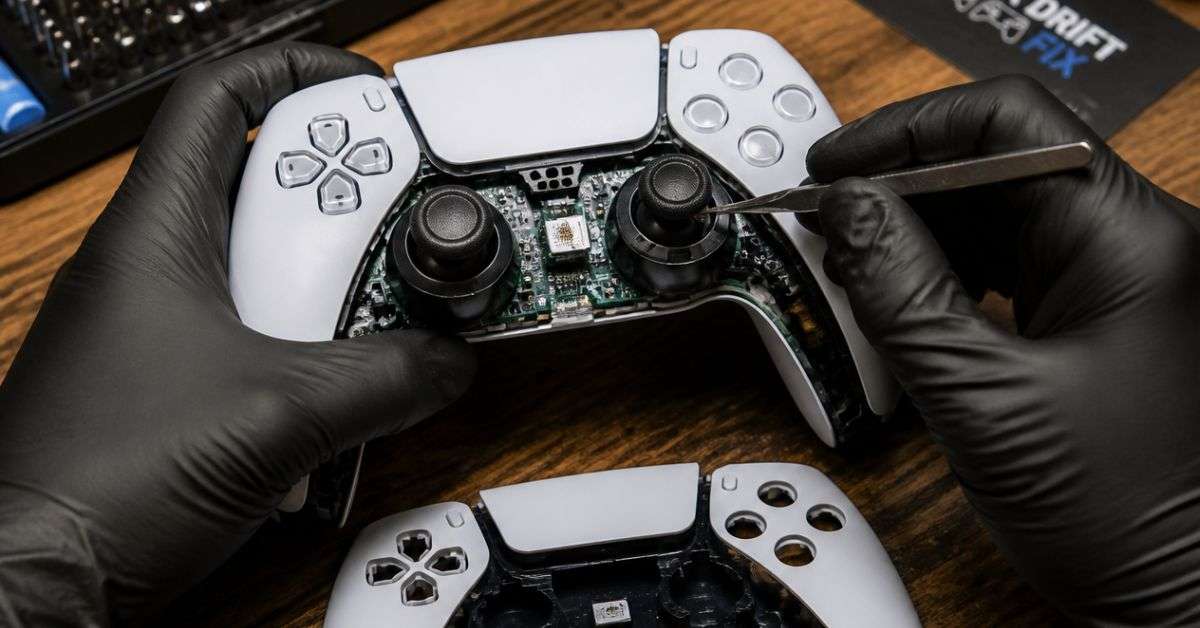
Before you spend money replacing your DualSense controller, there’s something worth knowing: stick drift can sometimes be repaired.
If you’re searching for PS5 controller repair in Chennai, ConsoleFixit offers controller repair enquiries at its Vadapalani, Anna Nagar, Chromepet, and Arumbakkam locations.
Let’s understand why stick drift happens, what you can safely try at home, and when professional repair makes sense.
What Is PS5 Controller Stick Drift?
Stick drift happens when your controller registers analogue-stick movement even though you’re not intentionally moving the stick.
For example:
Your game character walks forward automatically.
Your aiming crosshair moves without input.
The camera rotates continuously.
Your character moves sideways even after you release the stick.
The analogue stick responds inconsistently during gameplay.
Sometimes the problem appears only occasionally. In other cases, it becomes so noticeable that playing certain games is difficult.
Stick drift can affect either the left or right analogue stick.
Why Does a PS5 Controller Develop Stick Drift?
There isn’t one single reason behind every case.
1. Wear Inside the Analogue Stick
The analogue stick contains components that detect movement.
With repeated use, parts of this mechanism can wear down, eventually causing inaccurate input readings.
This can happen gradually and may become more noticeable over time.
2. Dust and Dirt Around the Stick
Dust, dirt, and other small particles can collect around the analogue stick.
Depending on where the contamination is located, it may interfere with normal movement or sensing.
Surface cleaning may help some problems, but contamination inside the controller may require further inspection.
3. Accidental Damage
Dropping a controller or applying excessive force to an analogue stick can damage its internal components.
Even if the controller looks fine from the outside, the mechanism may no longer work correctly.
4. Game Settings or Software Problems
Sometimes what appears to be stick drift is related to a particular game’s controller sensitivity or deadzone settings.
A software issue is different from physical damage, so it’s useful to test your controller before assuming a component needs replacement.
Start your Buy, Sell, Repair Game Console. To find your closest store
Leave your mobile phone number and we will call you back
5 Things to Try Before Visiting a PS5 Controller Repair Shop
1. Restart Your PlayStation 5
Turn off your PS5 completely and restart it.
Reconnect your controller and test it again.
This simple step won’t fix worn-out hardware, but it can help rule out a temporary software problem.
2. Update Your DualSense Controller Software
Sony releases controller software updates that can improve compatibility and resolve certain issues.
If the problem is caused by physical wear, a software update may not resolve it.
3. Test the Controller in Another Game
If your controller behaves strangely in only one game, check that game’s controller settings.
Some games allow you to adjust the analogue-stick deadzone, which determines how much stick movement is ignored.
Increasing the deadzone slightly may reduce minor unwanted movement, although it doesn’t repair a damaged component.
If the problem occurs across multiple games, the controller itself may need attention.
4. Gently Clean Around the Analogue Sticks
With the controller switched off, use a clean, dry, soft cloth to remove visible dust from around the analogue-stick housing.
Avoid pouring cleaning liquids into the controller or using unnecessary force.
Do not attempt to open the controller unless you have the appropriate skills and tools.
5. Reset the DualSense Controller
Sony also recommends resetting the controller when troubleshooting certain problems.
Turn off your PS5, locate the small reset button on the back of the DualSense controller, and press it gently with a suitable pin for at least five seconds.
Then reconnect the controller to your console using a compatible USB data cable and press the PS button.
If the controller still drifts, the issue may require hardware diagnosis.
Can PS5 Controller Stick Drift Be Repaired?
Yes. Some stick drift problems can be repaired, depending on the cause and the condition of the controller.
Possible repair work may include internal inspection, appropriate cleaning, or replacing a faulty analogue-stick component.
The correct solution depends on the diagnosed fault.
A controller that drifts because of physical component wear may require different work from one affected by a software configuration issue.
At ConsoleFixit, customers can enquire about PS5 DualSense controller stick drift diagnosis and repair.
Is It Better to Repair or Replace a PS5 Controller?
Buying a replacement DualSense controller may seem like the easiest solution, but it isn’t always necessary.
If most controller functions still work, a repair may be worth considering.
Before deciding, compare the estimated repair cost with the price of a replacement controller.
Consider the age of your controller, any other faults, replacement-part availability, and the warranty terms.
If your controller is under Sony’s applicable warranty, check the manufacturer’s repair options before choosing an independent repair service.
PS5 Controller Repair Near You in Chennai
ConsoleFixit provides dedicated gaming console and controller service enquiries across four Chennai locations.
ConsoleFixit – Vadapalani
Looking for PS5 controller repair near Vadapalani?
Visit our Vadapalani branch to enquire about DualSense controller stick drift and other controller-related problems.
Location: KP Tower, 2nd Floor, Arcot Road, opposite Nexus Forum Vijaya Mall, Vadapalani, Chennai – 600026.
What Happens When You Bring a Controller for Repair?
The first step is to explain what’s wrong.
Tell the technician whether the left stick, right stick, or both are affected. Mention whether the drift happens constantly or only during certain games.
You can also explain any troubleshooting steps you’ve already tried.
The controller can then be assessed to determine whether repair is practical and what work may be needed.
Before approving a repair, ask about the price, estimated turnaround time, and applicable repair warranty.
Frequently Asked Questions
Where can I get PS5 controller stick drift repair in Chennai?
You can contact ConsoleFixit at Vadapalani, Anna Nagar, Chromepet, or Arumbakkam for PS5 controller stick drift repair enquiries.
Can PS5 stick drift be fixed permanently?
Replacing a faulty component may resolve the existing drift problem, but no repair can guarantee that a controller will never develop stick drift again.
How much does PS5 controller repair cost in Chennai?
The price depends on the fault, parts, and repair work needed. Contact ConsoleFixit for an assessment and quotation.
Does resetting a PS5 controller fix stick drift?
Resetting may help with certain software-related problems, but it will not reverse physical wear inside an analogue-stick component.
Can I repair my PS5 DualSense controller instead of buying a new one?
In many cases, repair is possible. A technician can assess the fault and help you compare the repair cost with replacement.
Don’t Let Stick Drift Ruin Your Next Gaming Session
Your controller is one of the most important parts of your gaming setup.
When it stops responding accurately, even your favourite games can become frustrating.
Instead of immediately replacing it, find out whether the problem can be repaired.
If you’re looking for PS5 controller stick drift repair in Chennai, contact your nearest ConsoleFixit branch and describe the problem.




 PlayStation Repair
 Xbox Repair
 Nintendo Repair
 Virtual reality (VR) Repair
 Accessories Repair