From here you can book your game console, controller repair with us
Game Console & Controller Repairs
Any PS5 Console, PS5 Controller
Any PS4 Console, PS4 Controller
Any Xbox Series Console, Xbox Series Controller
Any Xbox One Console, Xbox One Controller
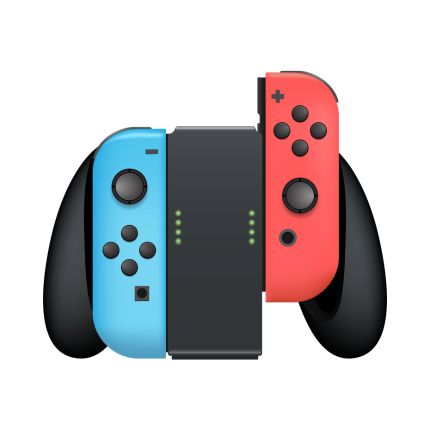
Any Nintendo Switch Console, Joy Con Controller
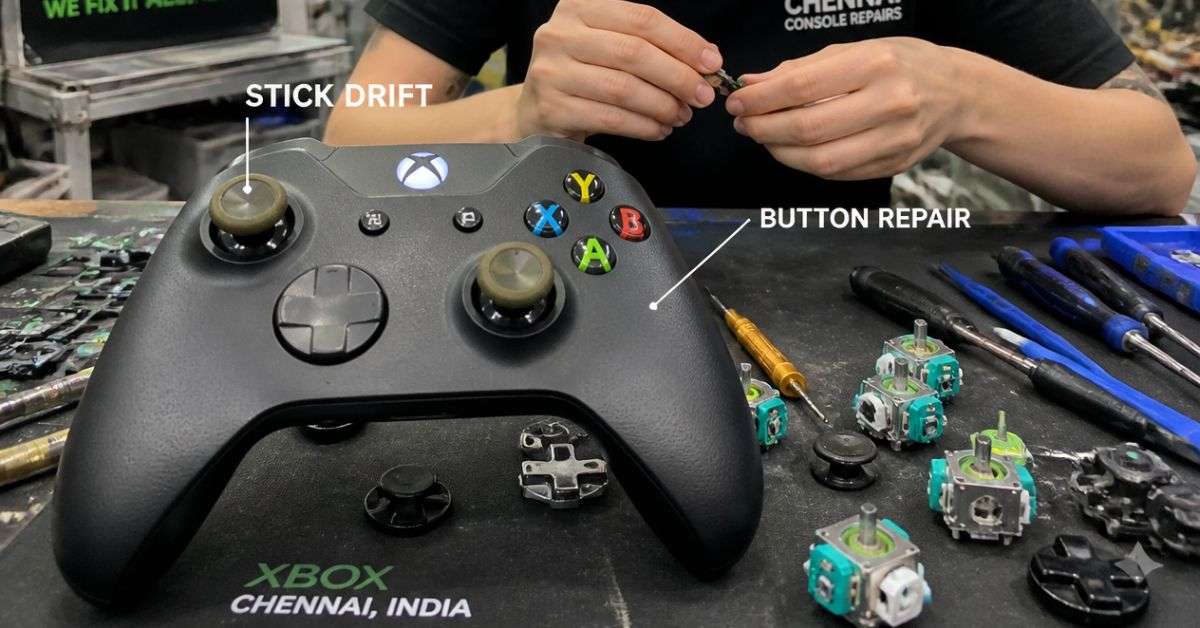
Xbox Controller Stick Drift or Buttons Not Working? Repair Options in Chennai
You’re in the middle of an exciting game of EA Sports FC, Forza Horizon, or Call of Duty when something strange happens.
Your character starts walking without you touching the joystick. Maybe your aim keeps moving to the left, or the A button stops responding just when you need it most.
You restart the game, reconnect your Xbox controller, and try again.
Unfortunately, the problem is still there.
If this sounds familiar, your Xbox controller may be experiencing analogue stick drift, button failure, or another hardware or software issue.
Before spending money on a new controller, it’s worth finding out whether your existing one can be repaired.
At ConsoleFixit Chennai, gamers can enquire about Xbox controller repair services at our branches in Vadapalani, Anna Nagar, Chromepet, and Arumbakkam.
Here’s what you should know before arranging a repair.
What Is Xbox Controller Stick Drift?
Stick drift occurs when your controller registers analogue-stick movement even though you’re not deliberately moving the stick.
For example, you might notice your player walking forward automatically, the camera rotating on its own, or your aiming crosshair slowly moving across the screen.
The problem may happen occasionally at first. Over time, it can become more noticeable.
Stick drift can affect Xbox One controllers, Xbox Series X/S controllers, and other compatible Xbox gamepads.
However, not every unwanted movement is caused by a broken component.
Sometimes game settings or controller calibration issues can produce similar symptoms.
5 Common Reasons Xbox Controllers Stop Working Properly
1. Analogue Stick Wear
Xbox controller analogue sticks contain components that detect movement.
With frequent use, parts of the mechanism may gradually wear down.
This can result in inaccurate movement detection or unwanted input.
Physical component wear is one possible cause of persistent stick drift.
2. Dust and Dirt Around the Controls
Gaming controllers are handled regularly, making it easy for dust and debris to accumulate around buttons and joysticks.
Contamination can sometimes interfere with normal button movement.
While external cleaning may help with surface dirt, internal contamination can require further inspection.
3. Worn or Damaged Buttons
Have you noticed that the A button needs a harder press than usual?
Does the RB bumper sometimes fail to respond?
Buttons, switches, and internal contact components can deteriorate or become damaged over time.
The correct repair depends on which part is responsible for the problem.
4. Accidental Drops or Physical Damage
A controller may look perfectly fine after being dropped, but internal components can still suffer damage.
A fall can affect analogue sticks, bumpers, trigger mechanisms, or the circuit board.
If your problems started immediately after an impact, tell the technician.
5. Software, Firmware, or Game Settings
Not every controller problem requires hardware repair.
Outdated controller firmware, incorrect button mapping, or certain game settings can sometimes cause confusing symptoms.
That’s why it’s a good idea to try basic troubleshooting before replacing parts.
Start your Buy, Sell, Repair Game Console. To find your closest store
Leave your mobile phone number and we will call you back
7 Things to Try Before Getting Your Xbox Controller Repaired
1. Restart Your Xbox Controller
Turn off your Xbox controller by holding the Xbox button for approximately six seconds.
Then press the Xbox button to switch it on again.
Check whether the controller responds normally.
If the issue was temporary, restarting may help.
2. Test the Controller in Another Game
Some games use different movement sensitivity and deadzone settings.
If stick drift appears only in one game, check that game’s controller options.
Adjusting the deadzone may reduce minor unintended movement.
However, increasing the deadzone doesn’t physically repair worn-out analogue-stick components.
3. Update Your Controller Firmware
Microsoft provides controller firmware updates through the Xbox Accessories app.
On a compatible Xbox console:
Open Settings.
Select Devices & connections.
Open Controllers & headsets or Accessories, depending on your system interface.
Select your connected controller.
Check for available firmware updates.
You can also use the Xbox Accessories app on a compatible Windows PC.
Follow the on-screen instructions and avoid disconnecting the controller during an update.
4. Try Xbox Thumbstick Recalibration
Microsoft provides a thumbstick recalibration tool through the Xbox Accessories app for supported controllers.
This feature can help address minor thumbstick response inconsistencies.
Open Xbox Accessories, select your controller, and look for the available calibration options.
Follow the guided process if your controller supports it.
Important: Recalibration cannot fix every stick drift problem, especially drift caused by physical wear.
5. Check Your Controller Batteries
If your Xbox controller disconnects unexpectedly or doesn’t respond consistently, check its power supply.
Try fresh batteries or a properly charged compatible rechargeable battery pack.
You can also test a suitable USB data connection to help identify whether the problem is related to wireless connectivity.
6. Inspect the Buttons and Joysticks
Look carefully for physical signs of damage.
Check whether the buttons are stuck, the joysticks appear tilted, or the bumpers feel loose.
With the controller powered off, gently wipe accessible exterior surfaces using a soft, dry cloth.
Avoid pouring liquids into the controller or inserting sharp objects around the buttons.
7. Arrange a Professional Inspection
If your controller continues drifting, misses button presses, or behaves inconsistently after troubleshooting, hardware diagnosis may be necessary.
A technician can inspect the controller and identify whether a component needs cleaning, repair, or replacement.
Xbox Controller Buttons Not Working – What Could Be Wrong?
Stick drift isn’t the only frustrating controller problem.
Sometimes the analogue sticks work perfectly, but the buttons don’t respond properly.
Different symptoms can indicate different faults.
A, B, X, or Y Buttons Not Responding
If one of these buttons requires repeated pressing, the problem may involve a worn internal contact, damaged component, or obstruction.
Testing the controller across different games can help rule out unusual button mapping.
RB or LB Bumper Not Working
The bumper buttons are used frequently in many games.
If a bumper feels loose, clicks differently, or stops responding, a mechanical component or internal switch may need inspection.
LT or RT Trigger Problems
Triggers can develop inconsistent responses or become physically damaged.
Some supported Xbox controllers provide trigger calibration options through the Xbox Accessories app.
Calibration may help minor response issues, but it cannot repair broken mechanical components.
Xbox Controller Randomly Disconnecting
Unexpected disconnections may involve batteries, wireless interference, firmware, or hardware faults.
Testing the controller with a suitable wired connection can help narrow down the cause.
Can Xbox Controller Stick Drift Be Repaired?
Yes. Some Xbox controller stick drift problems can be repaired.
Depending on the fault, a technician may recommend cleaning, recalibration, or replacing a defective analogue-stick component.
However, a repair should be based on the condition of the controller rather than symptoms alone.
For example, a worn joystick mechanism may require component replacement, while an incorrect game deadzone setting may not need hardware work at all.
ConsoleFixit customers can enquire about Xbox analogue stick and controller repair services in Chennai.
Is It Better to Repair or Replace an Xbox Controller?
Buying a new controller can be convenient, but replacement isn’t always the most economical option.
If your controller is otherwise functioning properly and only one component is faulty, repair may be worth considering.
Compare the repair quotation with the price of a suitable replacement.
Also consider the controller’s age, physical condition, model, and available warranty options.
A relatively new controller with one repairable fault may be a better repair candidate than an older controller with several damaged components.
Xbox Controller Repair in Chennai – Find Your Nearest ConsoleFixit Branch
Whether you’re using an Xbox Series X, Xbox Series S, or Xbox One controller, you can contact ConsoleFixit for repair enquiries.
Our Chennai locations include:
ConsoleFixit Vadapalani
Looking for Xbox controller stick drift repair near Vadapalani?
Our Vadapalani location is situated on Arcot Road, opposite Nexus Forum Vijaya Mall.
Address: No. 159, KP Tower, 2nd Floor, Arcot Road, opposite Nexus Forum Vijaya Mall, Vadapalani, Chennai – 600026.
How Much Does Xbox Controller Repair Cost in Chennai?
The repair cost depends on the problem identified, controller model, replacement parts, and work required.
A simple calibration issue is different from replacing a damaged joystick or internal button switch.
Before approving any repair, ask for a quotation, expected completion time, parts information, and applicable service warranty.
If your controller is still covered by Microsoft’s warranty, check the official service options before choosing a third-party repair.
Frequently Asked Questions About Xbox Controller Repair
Why is my Xbox controller moving on its own?
Your controller may be experiencing stick drift, a calibration problem, or unsuitable game deadzone settings. Test it in another game and check for available calibration options.
Can Xbox controller stick drift be fixed?
Some stick drift problems can be corrected through recalibration or hardware repair. The appropriate solution depends on the cause.
Can Xbox controller buttons be repaired?
Yes. Certain button and bumper faults can be repaired, depending on the condition of the affected components and the availability of suitable parts.
Can Xbox controller recalibration fix stick drift permanently?
Calibration may resolve certain minor response problems, but it cannot reverse normal physical wear inside a damaged analogue-stick mechanism.
Does ConsoleFixit repair Xbox Series X and Xbox One controllers?
ConsoleFixit advertises Xbox Series and Xbox One controller repair services. Contact your preferred Chennai branch to confirm repair options for the particular model and fault.
Where can I repair an Xbox controller in Chennai?
You can contact ConsoleFixit at Vadapalani, Anna Nagar, Chromepet, or Arumbakkam to enquire about Xbox controller repairs.
Don’t Let a Faulty Xbox Controller Interrupt Your Gaming
A controller that drifts or fails to respond can make even your favourite games difficult to enjoy.
But a controller problem doesn’t always mean you need to buy a replacement.
Start with simple troubleshooting, check for firmware updates, and test the controller’s settings.
If the issue continues, arrange an inspection to understand the available repair options.
Looking for Xbox controller stick drift or button repair in Chennai?
Contact your nearest ConsoleFixit branch and tell our team about the problem.



 PlayStation Repair
 Xbox Repair
 Nintendo Repair
 Virtual reality (VR) Repair
 Accessories Repair