Xbox One Kinect Repair
Discover how to troubleshoot and fix issues with your Xbox One Kinect Repair. Get back to gaming with ease!
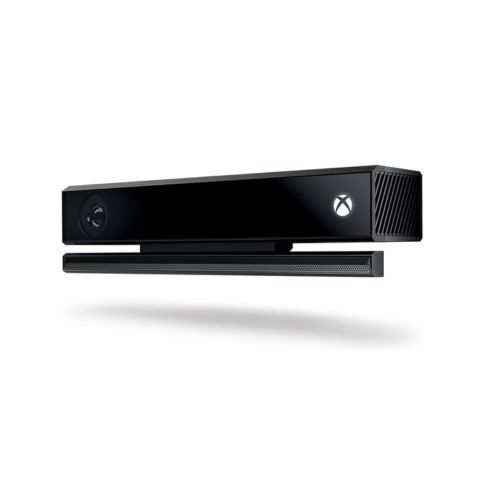
Are you having a specific issue with your Xbox One Kinect, or are you looking for general repair guidance? Here are some common Kinect problems and their solutions:
1. Kinect Not Powering On / Not Recognized
✅ Fixes:
- Check the connection: Ensure the Kinect is properly connected to the Kinect port on the Xbox One.
- Use a Kinect Adapter (for Xbox One S/X): If using an Xbox One S or X, make sure you have the official Kinect adapter.
- Restart the Console:
- Unplug the Kinect from the Xbox.
- Power cycle the Xbox (hold the power button for 10 seconds).
- Reconnect the Kinect and turn the Xbox back on.
- Check Kinect Settings:
- Go to Settings > Devices & Accessories > Kinect and check if it’s detected.
- If the Kinect still doesn’t turn on, the internal power circuit may be faulty and need repair.
2. Kinect Not Tracking Movement / Poor Detection
✅ Possible Solutions:
- Clean the camera lens with a microfiber cloth.
- Ensure the room has proper lighting (avoid direct sunlight or very dim areas).
- Adjust Kinect position for a clear line of sight with no obstructions.
- Recalibrate Kinect:
- Go to Settings > Kinect & Devices > Kinect and run Kinect Calibration.
3. Kinect Voice Commands Not Working
✅ Fixes:
- Check the microphone: Speak clearly and at a normal volume.
- Ensure Kinect is enabled: Go to Settings > Kinect & Devices > Kinect and enable voice commands.
- Test with Cortana: If Cortana is disabled, voice commands may not work properly.
- If the microphone still doesn’t work, the Kinect mic array may be damaged.
4. Kinect Adapter Issues (For Xbox One S/X Users)
✅ Troubleshooting:
- Ensure you’re using an official Xbox Kinect adapter (third-party adapters may not work properly).
- Check if the adapter’s power light is on.
- Try connecting the adapter to a different power outlet.
- If the adapter is faulty, a replacement adapter may be needed.
5. Kinect Overheating / Randomly Disconnecting
✅ Fixes:
- Ensure the Kinect is in a well-ventilated area.
- Use a powered USB hub if using an adapter to ensure sufficient power supply.
- If the Kinect shuts down after extended use, the internal cooling system may be failing.





 PlayStation Repair
 Xbox Repair
 Nintendo Repair
 Virtual reality (VR) Repair
 Accessories Repair
Reviews
There are no reviews yet.